
Need for Speed™ Heat
Hustle by day and risk it all at night in Need for Speed™ Heat Deluxe Edition, a white-knuckle street racer, where the lines of the law fade as the sun starts to set.
Play Need for Speed™ Heat on macOS
Need for Speed™ Heat plays alright using CrossOver and poorly using Parallels on macOS. See playability reports below for detailed information.
Need for Speed™ Heat is playable on macOS using CrossOver. CrossOver is the most popular way to play Windows games on macOS.
15% off coupon code: MACGAMERS15
Need for Speed™ Heat is playable on macOS using Parallels. Parallels is virtual machine software that lets you run Windows on macOS.
Playability Reports
Discuss playing Need for Speed™ Heat on macOS in our forums.
Discuss playing Need for Speed™ Heat on macOS in our forums.
- Mac mini M4
- 24GB RAM
- 10-Core CPU
- 10-Core GPU
- macOS Sequoia
- Method
- CrossOver v25.1.0
- Game Launcher
- EA App
Comments
The sound cuts out for a second every now and then and sometimes the frame rate feels under 30 but other otherwise plays well.
- Mac mini M4
- 24GB RAM
- 10-Core CPU
- 10-Core GPU
- macOS Sequoia
- Method
- Parallels (Windows) v20.4.1
- Game Launcher
- EA App
Comments
It feels like 20-25 FPS with some big frame drops (probably as it's loading map data).
About Need for Speed™ Heat
Hustle by day and risk it all at night in Need for Speed™ Heat, a white-knuckle street racer, where the lines of the law fade as the sun starts to set. By day, Palm City hosts the Speedhunter Showdown, a sanctioned competition where you earn Bank to customize and upgrade your high-performance cars. At night, ramp up the intensity in illicit street races that build your reputation, getting you access to bigger races and better parts. But stay ready – cops are waiting and not all of them play fair.
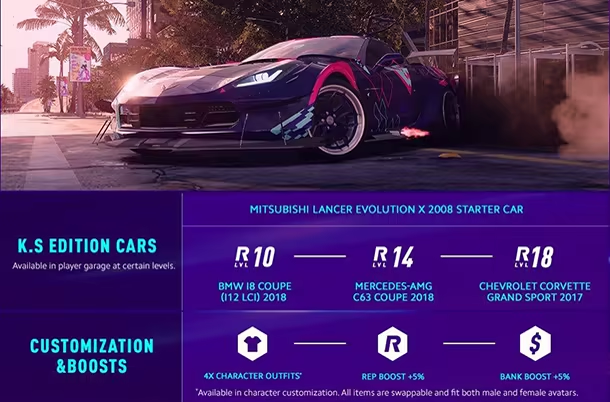
The Deluxe Edition comes with:
- K.S Edition Mitsubishi Lancer Evolution X Starter Car, available at start in player garage
- 3 additional K.S Edition cars unlocked through progression
- 4 exclusive character outfits — swappable and fit both male and female avatars
- REP rewards increased by 5%
- BANK rewards increased by 5%
Need for Speed Heat is Crossplay enabled.